The AI Utility Tax: Why Privacy-Bound and Compute-Poor Teams Are Skipping the AI Platform for PDF Tables
A business brief on why capable PDF table extraction still fails teams that cannot absorb setup, metering, and retention costs.
For analysts, operations leads, and privacy-bound teams
The gap between what AI can do and what your team can use
Table extraction from PDFs is, technically, a solved-enough problem. Layout-aware models handle merged cells, borderless tables, and scanned pages far better than the ruling-line heuristics of a decade ago. The research is public, the benchmarks are open, and the weights are downloadable.
And yet people are still retyping tables into Excel.
The reason is not capability. It is access. Between the state of the art and the person who needs a CSV by Thursday sits a stack of prerequisites that has quietly grown into a tax.
- A cloud account with billing attached.
- An API key and someone permitted to hold it.
- A Python environment, or a GPU, or both.
- A security review to determine whether documents may leave the building.
- A pricing model that nobody can forecast before the invoice arrives.
Each item is individually reasonable. Together they price out exactly the users with the most tabular data trapped in PDFs and the least infrastructure to free it.
Three taxes, itemized
- The setup tax. Open-source is free and expensive. Camelot and pdfplumber require Python and, for anything irregular, custom tuning per document class. Docling ships a strong ML pipeline and expects you to install it, feed it, and keep it running. Tabula avoids the coding but cannot read a scanned page at all. Free means you are the integration budget.
- The metering tax. Cloud document APIs such as AWS Textract, Azure Document Intelligence, and Adobe PDF Extract API price per page, per feature, or per call. For predictable enterprise pipelines that is fine. For teams that process eleven documents in March and four hundred in April, it becomes an unforecastable line item.
- The retention tax. This is the one that kills deployments outright. Ask whether a bank statement, patient-linked results table, unfiled financial statement, or client contract may be uploaded to a document-processing SaaS that stores files against your account, and the answer is often no, or a long review that ends in no.
What the landscape actually looks like
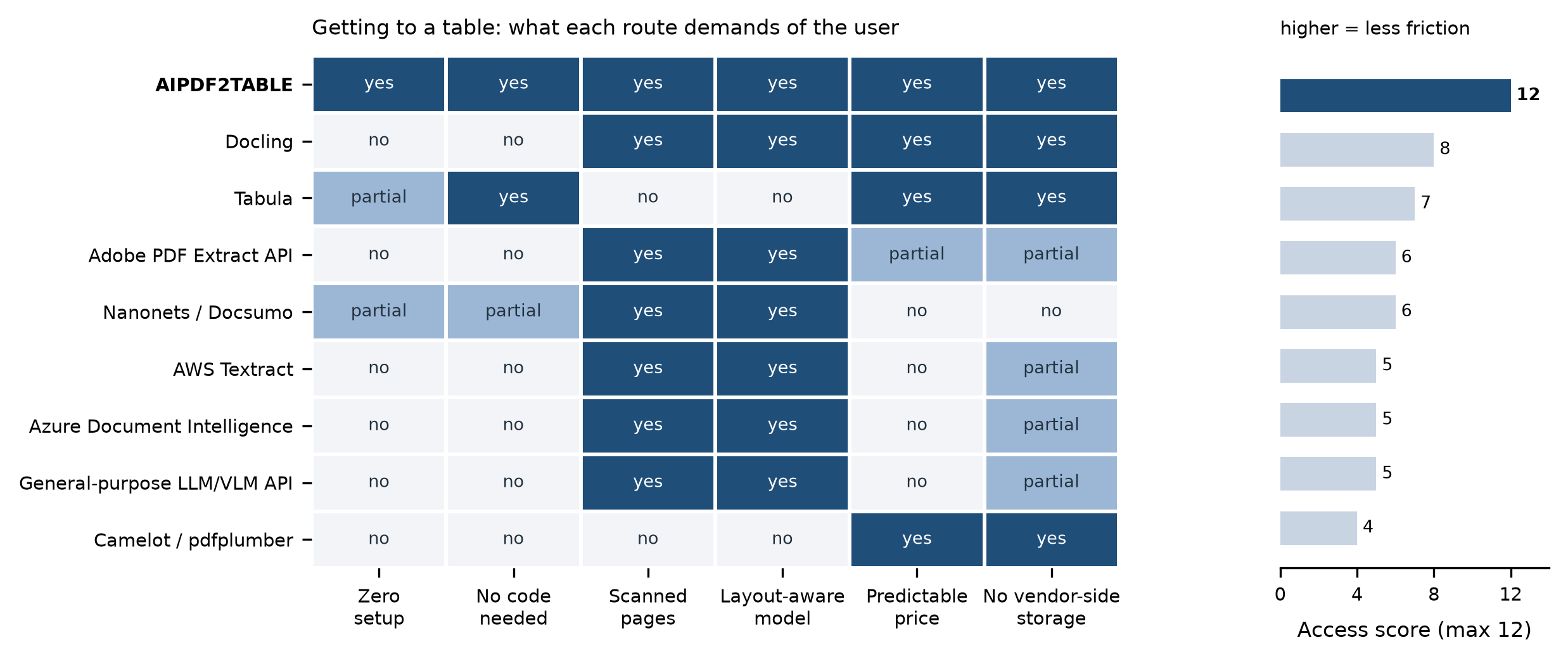
We scored nine common routes to a table on six access-model attributes. The score is not extraction accuracy, which is corpus-dependent and should be tested on your own documents. It is a measure of what each route demands before it produces anything.
The pattern is consistent and, once seen, hard to unsee. The tools with modern layout-aware models are concentrated in the columns that also demand code, cloud accounts, or per-page metering. The tools that are easy to reach are the ones running older heuristics that cannot read a scan.
Capability and accessibility are inversely correlated across almost the entire market. That inverse correlation is the opportunity, and it is the core thesis behind AIPDF2TABLE.
The underserved middle
Vendor roadmaps are built for the extremes. At one end, the enterprise pipeline: ten thousand invoices a month, an integration team, and a signed DPA. At the other, the free online converter: one page, a watermark, an ad wall, and output you would not trust with a phone bill.
The middle is enormous and ignored. It is the analyst with forty bank statements to reconcile. The PhD student pulling results tables from sixty papers into one meta-analysis. The operations lead whose vendor sends a monthly PDF report that has to become a dashboard row. The paralegal extracting a schedule from an exhibit.
None of them will build a pipeline. All of them need structure recognition that actually works on merged cells.
What AIPDF2TABLE does differently
- Start in the browser, finish in the browser. Upload, select pages, set chunk size, and download. No installation, no API key, no cloud console, no Docker. Three free trials require only an email address, with no password and no card.
- Built for the difficult files, not the demo file. The target problem space is stated plainly: research papers, bank statements, financial reports, scanned PDFs, repeated headers, split tables across pages, and irregular layouts.
- Pricing you can predict before you start. A $7.99 student plan for valid .edu addresses, a $19 one-time pack for occasional projects, a $25 monthly subscription, or a $249 yearly plan. No per-page meter, no token accounting, and no surprise invoice.
- Your files do not become someone else's dataset. Files are processed for the extraction task, results are made available to download, and the product is not built around retaining documents or extracted tables.
- A splitter that lives next to the extractor. The companion PDF splitter trims a long document to the pages you actually need, pairs naturally with the 50-page working limit, and supports better extraction methodology.
Being straight about the limits
Marketing that hides constraints wastes everyone's time. Individual documents are capped at 50 pages on public plans. Split first, or book a call if your documents run longer.
The tool extracts tables. It does not edit them, and it is not a full document-processing suite. Purchases are final and non-refundable, though support works technical issues directly.
If you need a fully integrated IDP platform with human-in-the-loop review queues and a template library, buy one of those. If what you need is clean CSV out of difficult PDFs today, without a procurement cycle or a GPU, that is the specific job this was built for.
The bottom line
The bottleneck in document AI stopped being model quality some time ago. It is now distribution: who can actually reach a good model, under what privacy terms, and at what predictable cost.
Every hour an analyst spends retyping a table is an hour lost to an access problem, not a technology problem.
Extract tables from your PDF
Upload a PDF, choose a page range, and download clean table data as CSV.
Try PDF2TABLE